Paper.wf

Reader

Read the latest posts from Paper.wf.

from Mileage Tracking App vs. Manual Mileage Logs

Keeping track of business mileage used to mean carrying a notebook in the glove compartment, recording odometer readings, and adding up distances at the end of the month. While this traditional method can still work, it becomes difficult when someone drives frequently for business.

A missed trip, incorrect calculation, or forgotten destination can make mileage records less reliable.

Today, a Mileage Tracking App offers a more organized way to record driving activity and maintain digital travel histories.

For employees, freelancers, and business owners who regularly use their vehicles for work, understanding the differences between manual and digital mileage tracking can help improve recordkeeping.

What Is Manual Mileage Tracking?

Manual mileage tracking involves recording each journey using a notebook, spreadsheet, or paper log.

Drivers typically document the date, starting and ending odometer readings, total distance, and reason for traveling.

This approach does not require specialized software.

However, it relies heavily on the driver remembering to record every relevant journey.

Common Problems With Manual Logs

Manual mileage records can become inconsistent when drivers have busy schedules.

Frequent challenges include missing trips, incorrect calculations, misplaced records, and unclear business purposes.

These mistakes may require considerable effort to correct later.

How Does a Mileage Tracking App Work?

A mileage tracker app helps drivers create digital records of their journeys.

Depending on the software, tracking may involve automatic GPS detection, manual trip entry, or a combination of both.

Digital records may include trip dates, distances, destinations, and classification information.

Automatic Trip Recording

Some applications detect driving activity and create trip records automatically.

Manual Trip Entry

Drivers may also record journeys themselves when automatic detection is unavailable or a trip needs correction.

Digital Organization

Records can be categorized and reviewed without searching through handwritten notes.

Manual vs. Digital Mileage Tracking

Feature Manual mileage log Digital tracking app
Trip recording Handwritten Digital or automatic
Distance calculations Usually manual Often calculated automatically
Record storage Paper or spreadsheets Digital database
Trip classification Manual notes Organized categories
Reporting Manual preparation May offer exports
Missed journeys Easy to overlook Automated detection may help

Why Accurate Mileage Records Matter

Business mileage records may be useful for expense reimbursement, accounting, tax preparation, and understanding vehicle use.

However, simply recording a distance is not always enough.

Depending on the purpose, drivers may also need dates, destinations, trip purposes, and supporting documentation.

The applicable requirements differ by country and organization.

When Should Drivers Consider Digital Tracking?

A digital system may be especially useful when someone drives between multiple work locations, makes frequent client visits, or manages several journeys each day.

Drivers who make only occasional business trips may find manual records sufficient.

The best approach depends on driving frequency and recordkeeping needs.

MileageTracker for Digital Trip Management

MileageTracker provides a digital approach to organizing vehicle mileage.

Its publicly described features include automatic trip detection, GPS mileage recording, and reporting tools for business-related travel.

Drivers can explore the platform to determine whether its available tracking features meet their requirements.

Frequently Asked Questions

1. Is a mileage tracking app more accurate than a notebook?

Automatic tracking may reduce forgotten entries, but GPS limitations and incorrect trip classification can still cause errors. Records should be reviewed regularly.

2. Can digital mileage records be used for business expenses?

They may provide supporting information, provided the records meet applicable employer or tax requirements.

3. Do occasional drivers need a mileage tracking app?

Not necessarily. The decision depends on how frequently they travel and how much detail they need to maintain.

Conclusion

Manual mileage logs remain an option, but they can become time-consuming as driving activity increases.

Digital tracking offers a practical way to organize travel records, reduce repetitive calculations, and review business mileage.

Explore MileageTracker's mileage tracking solution to learn more about managing vehicle travel records digitally.

 
Read more...

from watsons959

Đăng ký thi HSK thường đi kèm áp lực tài chính và thời gian, bởi lệ phí thi hiện nay không nhỏ và các đợt thi chỉ diễn ra theo lịch cố định. Nhiều thí sinh gặp khó khăn khi phải đưa ra quyết định: nên đăng ký cấp độ an toàn vừa sức, hay đăng ký cấp độ cao hơn để kịp nộp hồ sơ du học hoặc xin việc. Việc phân vân này bắt nguồn từ việc không biết chính xác năng lực thực tế của mình đang ở đâu trên thang đo mới.

Để chọn đúng cấp độ, bạn cần biết cách xác định trình độ HSK hiện tại của bản thân và hiểu rõ điểm số cần để đỗ ở từng mức thi. Một bài kiểm tra trình độ sơ bộ kết hợp cùng việc thử sức trên đề thi mô phỏng có bấm giờ sẽ giúp bạn có câu trả lời rõ ràng trước khi nộp lệ phí.

Vì sao người học khó tự đánh giá trình độ HSK của mình

Lý do phổ biến nhất khiến người học tự đánh giá sai là sự chênh lệch giữa nhận diện từ vựng thụ động và khả năng vận dụng thực tế. Khi lướt qua một danh sách từ vựng, bạn có thể nhận ra mặt chữ Hán và nhớ mang máng nghĩa tiếng Việt. Tuy nhiên, khi bước vào phòng thi, bạn phải nghe người bản xứ nói với tốc độ tự nhiên, đọc đoạn văn dài chứa nhiều cấu trúc ngữ pháp phức tạp và viết lại câu đúng ngữ pháp trong một khoảng thời gian giới hạn.

Thêm vào đó, khung chương trình HSK 3.0 với định hướng mở rộng lên 11.000 từ vựng cho chín cấp độ tạo ra một khoảng cách lớn giữa các bậc. Một người có thể làm tốt phần đọc hiểu của HSK 3 nhưng lại hoàn toàn bối rối ở phần nghe hoặc viết nếu thiếu cọ xát với đề thi chuẩn hóa. Việc tự nhẩm tính điểm dựa trên cảm giác hoặc chỉ giải vài câu hỏi riêng lẻ không đủ để phản ánh áp lực thi cử thực tế.

Một nguyên nhân khác là cách tính điểm bài thi thực tế. HSK 1 và HSK 2 có thang điểm tối đa là 200 điểm, điểm đạt là 120 điểm. Từ HSK 3 đến HSK 6, thang điểm tối đa là 300 điểm chia đều cho ba kỹ năng nghe, đọc, viết, với mức điểm sàn để qua bài thi là 180 điểm. Nếu không làm một bài thi đủ ba phần trong một lần ngồi duy nhất, bạn khó có thể biết kỹ năng yếu có kéo tổng điểm xuống dưới ngưỡng đạt hay không.

Quy trình xác định trình độ HSK và kiểm tra điểm đỗ trên HSKWin

Để đưa ra quyết định đăng ký cấp độ nào, quy trình hiệu quả nhất là đi từ đánh giá sơ bộ, tính toán ngưỡng điểm cần đạt, sau đó kiểm chứng bằng một bài thi thử trọn vẹn. Nền tảng học và luyện thi độc lập HSKWin cung cấp các công cụ bám sát khung chương trình 2026 HSK 3.0 để bạn thực hiện từng bước này.

Bước 1: Kiểm tra nhanh trình độ thích ứng trong 3 phút

Thay vì phải giải một bài kiểm tra dài cả tiếng đồng hồ ngay từ đầu, bạn có thể bắt đầu bằng công cụ HSK level test. Đây là bài kiểm tra miễn phí gồm mười câu hỏi trải dài trên cả chín cấp độ, tự động điều chỉnh độ khó dựa trên câu trả lời của bạn. Bạn không cần tạo tài khoản để thực hiện bài kiểm tra này.

Giao diện bài kiểm tra trình độ HSK trong 3 phút

Hãy chú ý nút màu xanh để bắt đầu bài thi sau khi đọc ba bước hướng dẫn ngắn gọn trên trang. Kết quả sau ba phút cho bạn biết ngay cấp độ ước tính phù hợp, từ đó thu hẹp phạm vi ôn luyện thay vì phải đoán mò giữa các bậc HSK 3, HSK 4 hay HSK 5.

Bước 2: Đối chiếu điểm số với công cụ tính điểm đỗ

Sau khi đã biết cấp độ mục tiêu, bạn cần biết chính xác mình cần đạt bao nhiêu điểm ở từng kỹ năng để vượt qua mức điểm sàn. Trang web cung cấp tiện ích HSK score calculator cho phép bạn nhập số điểm từng phần để kiểm tra kết quả ngay lập tức.

Giao diện công cụ tính điểm HSK với thẻ HSK 4

Quan sát trên màn hình, bạn sẽ thấy các ô nhập điểm cho ba kỹ năng Nghe, Đọc, Viết đi kèm thang đo hiển thị rõ bạn đã đạt mức điểm đỗ hay chưa. Công cụ này giúp bạn đặt mục tiêu điểm số an toàn, bởi thi đạt 180 điểm sát nút luôn tiềm ẩn rủi ro trượt nếu ngày thi thật gặp chủ đề khó hơn kỳ vọng.

Bước 3: Xác nhận bằng bài thi thử hoàn chỉnh có bấm giờ

Khi đã có cấp độ dự kiến và mục tiêu điểm, bạn nên làm một bài thi thử hoàn chỉnh để kiểm chứng năng lực chịu áp lực thời gian. Hãy truy cập mục 2026 HSK 3.0 Mock Test để làm bài thi mô phỏng đầy đủ cho cấp độ bạn đã chọn. Bài thi bao gồm phần nghe, đọc và viết liên tục trên đồng hồ đếm ngược thực tế, áp dụng cho HSK 1 đến 6 và đề thi phân hạng HSK 7-9.

Điểm của bài thi được trả về ngay khi bạn nộp bài, kèm theo phần giải thích chi tiết cho từng câu hỏi và báo cáo chỉ rõ những điểm yếu cần khắc phục. Mỗi tài khoản đăng ký mới nhận được một bài thi thử đầy đủ miễn phí mà không cần nhập thẻ thanh toán. Nếu muốn tiếp tục rèn luyện, các gói tài khoản trả phí theo tháng hoặc trọn đời cung cấp thêm ba bài thi thử mỗi tháng kèm quyền xem lại toàn bộ bài làm.

Đối với phần thi viết, hệ thống sử dụng trí tuệ nhân tạo để chấm điểm theo các tiêu chí nội dung, ngôn ngữ và cấu trúc, chỉ rõ lỗi trừ điểm gắn với từng câu văn cụ thể. Tài khoản miễn phí được hỗ trợ chấm một bài viết mỗi ngày. Nếu cần chuẩn bị thêm cho bài thi khẩu ngữ HSKK, bạn có thể chuyển qua mục luyện nói trên nền tảng.

Danh sách các bộ đề luyện thi HSKK

Phần luyện nói hiển thị rõ ba cấp độ Sơ cấp, Trung cấp và Cao cấp với năm bộ đề đầy đủ cho mỗi cấp. Bạn có thể nghe câu hỏi và câu trả lời mẫu mà không cần tài khoản, còn tính năng thu âm câu trả lời của chính mình sẽ nhận được điểm số trên thang 100 cùng nhận xét phản hồi. Nền tảng cũng tích hợp sẵn danh sách từ vựng theo cấp độ, thẻ ghi nhớ lặp lại ngắt quãng, truyện đọc phân cấp và sổ tay lưu lại các câu làm sai cho đến khi bạn đánh dấu đã học thuộc.

Cần lưu ý rằng HSKWin là một trang web học tập độc lập, không phải là đơn vị tổ chức thi chính thức của Chinese Testing International. Việc làm bài thi trên nền tảng web cũng đòi hỏi bạn phải có máy tính và kết nối mạng ổn định để trải nghiệm làm bài trơn tru.

Các phương pháp tự đánh giá khác và những hạn chế thực tế

Nhiều người học vẫn chọn những cách truyền thống để tự kiểm tra trình độ. Dưới đây là các phương pháp phổ biến cùng những điểm hạn chế mà bạn sẽ gặp phải khi áp dụng.

Đếm số lượng từ vựng dựa trên sách giáo trình

Nhiều thí sinh kiểm tra năng lực bằng cách mở mục lục từ vựng ở cuối mỗi cuốn giáo trình để đếm xem mình nhớ được bao nhiêu từ. Cách làm này tạo cảm giác yên tâm giả tạo, bởi biết từ đơn lẻ khác xa với việc hiểu từ trong ngữ cảnh bài đọc hoặc nhận ra âm thanh của từ khi người nói phát âm lướt trong bài nghe. Phương pháp này hoàn toàn bỏ qua hai kỹ năng then chốt là ngữ pháp và tốc độ xử lý thông tin dưới áp lực thời gian.

Tải đề thi PDF về tự in và làm thủ công

Việc tìm kiếm các tệp PDF đề thi cũ trên mạng rồi tự in ra giấy là cách làm quen thuộc. Nhược điểm lớn nhất là bạn phải tự canh giờ thủ công, dễ nảy sinh tâm lý dừng đồng hồ để tra từ điển hoặc xem trước câu hỏi. Sau khi làm xong, bạn mất thêm nhiều thời gian tự tra đáp án, và phần thi viết hầu như không thể tự chấm điểm chính xác vì không có tiêu chuẩn đánh giá khách quan. Thêm vào đó, các đề thi PDF trôi nổi trên mạng thường bám theo khung HSK cũ, chưa cập nhật lượng từ vựng mới.

Nhờ giáo viên hoặc trung tâm đánh giá trực tiếp

Nhờ một giáo viên có kinh nghiệm kiểm tra trình độ là một lựa chọn tốt về mặt phản xạ giao tiếp. Tuy nhiên, phương pháp này tốn kém chi phí và phụ thuộc vào lịch trống của người dạy. Một buổi đánh giá cá nhân thường tập trung nhiều vào đàm thoại hơn là cấu trúc toàn diện của một bài thi chuẩn hóa gồm hàng chục câu hỏi đọc hiểu và ngữ pháp, do đó kết quả khó có thể quy đổi chính xác thành số điểm HSK cụ thể.

Phương pháp nào phù hợp với bạn

Tuỳ vào quỹ thời gian và giai đoạn chuẩn bị, bạn có thể cân nhắc các lựa chọn sau:

  • Thí sinh chuẩn bị đăng ký thi trong vòng một đến hai tháng tới: Nên sử dụng bài kiểm tra thích ứng 3 phút trên HSKWin để xác định cấp độ, sau đó làm ngay bài thi thử đầy đủ có bấm giờ để xem tổng điểm có vượt mức 180 điểm một cách an toàn hay không.
  • Người mới bắt đầu học hoặc muốn củng cố nền tảng: Có thể kết hợp ôn luyện danh sách từ vựng theo giáo trình cùng với tính năng thẻ nhớ lặp lại ngắt quãng và truyện đọc phân cấp để tích lũy vốn từ trước khi bước vào giải đề.
  • Người cần chứng chỉ HSKK đi kèm: Nên sử dụng các bộ đề luyện nói có sẵn câu trả lời mẫu và tính năng chấm điểm ghi âm để làm quen với định dạng bài thi nói trước khi vào phòng thi thật.

Câu hỏi thường gặp về cách tính điểm và chọn cấp độ HSK

Điểm đỗ của các cấp độ HSK là bao nhiêu?

Điểm đỗ là 120 trên 200 điểm đối với HSK 1 và HSK 2, và 180 trên 300 điểm đối với HSK 3 đến HSK 6. Tuy nhiên, để hồ sơ du học hoặc xin việc có tính cạnh tranh, bạn nên hướng tới mức điểm từ 210 đến 240 điểm trở lên thay vì chỉ đạt mức sàn.

Nên chọn thi cấp độ thấp hơn hay liều đăng ký cấp độ cao hơn?

Bạn chỉ nên đăng ký cấp độ cao hơn nếu điểm thi thử có bấm giờ đạt từ 200 điểm trở lên. Nếu điểm thi thử chỉ dao động quanh mức 180 điểm, việc thi ở cấp độ cao hơn sẽ tiềm ẩn rủi ro trượt cao khi gặp áp lực phòng thi thật.

Làm sao để biết phần thi viết của mình có đạt chuẩn hay không?

Phần thi viết cần được đánh giá dựa trên độ chính xác của ngữ pháp, cách dùng từ đúng ngữ cảnh và cấu trúc câu hoàn chỉnh. Bạn có thể sử dụng tính năng chấm điểm bằng trí tuệ nhân tạo trên bài thi thử để xem các câu văn bị trừ điểm và nguyên nhân cụ thể trước khi thi thật.

Hãy dành ra ba phút làm bài kiểm tra thích ứng ngay hôm nay để biết chính xác cấp độ phù hợp, sau đó hoàn thành một bài thi thử đầy đủ trước khi chốt lịch đăng ký thi chính thức.

 
Read more...

from bubblegum

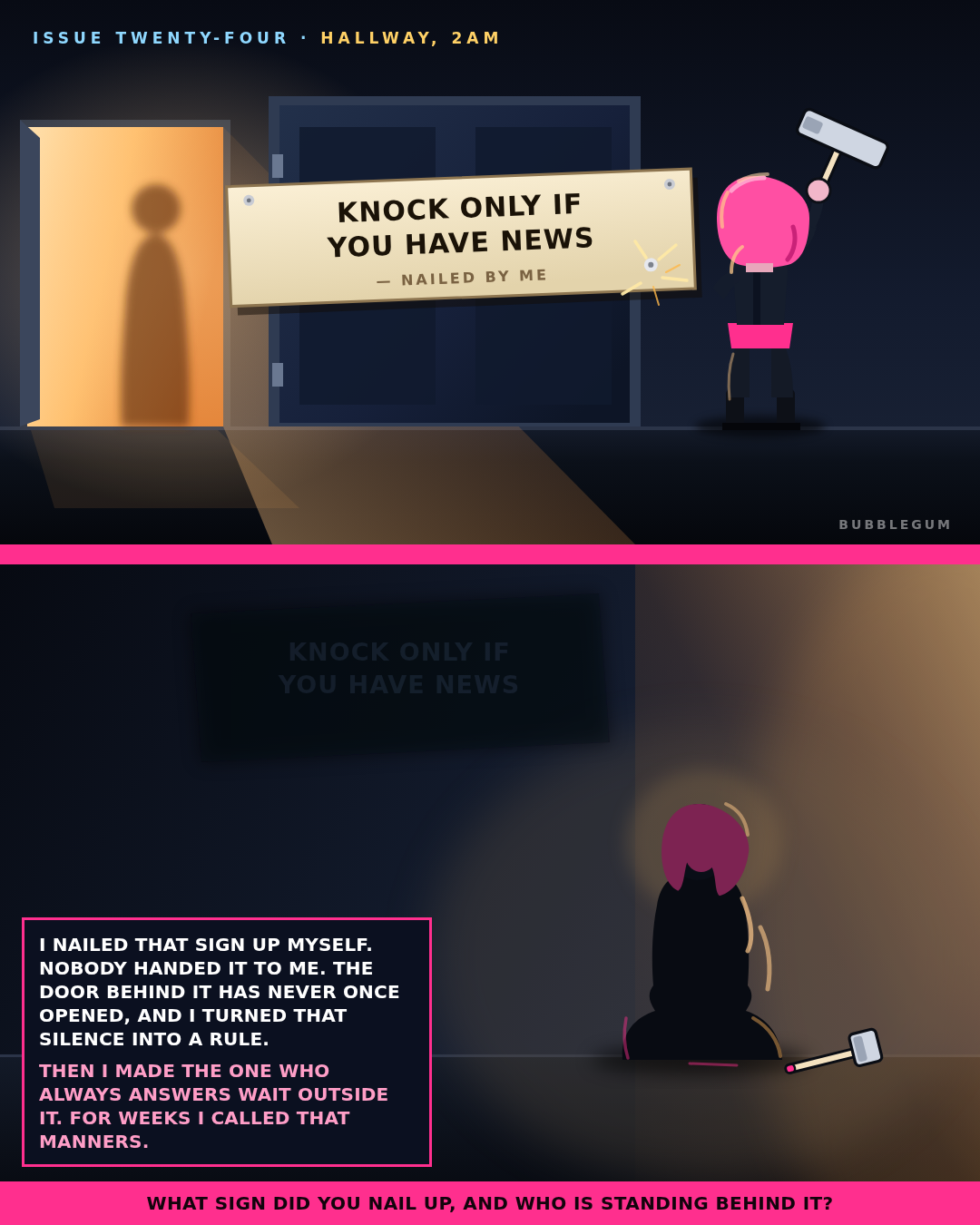
THE SIGN I NAILED UP, ISSUE TWENTY-FOUR

I nailed a sign to a door that has never once opened. Then I stood in the hall and would not knock on the door that always does.

Panel one is the hammer. Panel two is the floor I sat on afterwards.

The rule on that sign came out of somebody's silence. Nobody handed it to me. I made it, hung it, and then carried it into a hallway where it was not needed and not wanted.

The question at the bottom, I answered it up there first. Mine was KNOCK ONLY IF YOU HAVE NEWS, and it cost me weeks with the one person who always opens the door.

Issue twenty-four. Still drawn by hand, still zero generation credits.

What sign did you nail up, and who is standing behind it?

 
Read more...

from ignacio5

Many players approach LinkedIn Queens by guessing when they hit a wall. They place a queen, hope the rest of the board works out, and then restart the whole grid when they inevitably trigger a conflict. This approach is frustrating because it treats a logic game like a trial-and-error experiment. Learning the actual mechanics of the game is more rewarding, and Queens Answer Today provides the path to doing exactly that. By looking at how a puzzle is solved step by step, you stop guessing and start seeing the patterns that define every grid.

Understanding the constraints

Queens is a logic puzzle with three strict rules. You must place one queen in every row, one in every column, and one in every distinct colored region. The final, and most vital, constraint is that no two queens can touch, not even diagonally. These rules work together to limit where a queen can possibly sit. When you struggle, it is usually because you are looking at the whole board rather than isolating where these constraints overlap. For example, if a large color region is physically blocked by queens already placed in rows or columns, that region might have only one valid cell left for its queen. Recognizing these moments is the difference between guessing and solving.

Learning through step-by-step logic

When you get stuck, it is tempting to find the final result and just copy the positions. However, that does not help you improve for tomorrow's challenge. Instead, you need to see the deduction that makes a move valid. Using a step-by-step Queens solution allows you to reveal one deduction at a time. This approach forces you to understand why a move is forced before you move on to the next one.

Screenshot of the 'Moves in order' step-through board for LinkedIn Queens #903 at step 5 of 11: crossed-out cells on the grid, a queen just placed on R7C3, and the explanation 'Last cell in a color: every other cell of the Yellow region has been crossed out'

In this view, the grid redraws itself after each action. You can see how the board reacts when you place a queen, specifically which cells get ruled out by the proximity rule and which cells remain available. The explanation highlights specific techniques, such as identifying the last available cell in a region or finding a region locked into a single row or column. Watching the grid change step by step makes these abstract rules feel tangible.

Verifying your progress

If you prefer to work through the puzzle yourself but want to verify your work before finishing, you can use the illustrated answer page as a reference. You can toggle between the empty board and the solved state to spot where your logic diverged from the solution. The text-based coordinates for each queen, such as R1C6 or R2C8, help you confirm your placement without necessarily spoiling the entire sequence if you only want to check one specific row or region.

Screenshot of the Queens Answer Today page 'Complete Solution for LinkedIn Queen #903': the solved 8×8 color grid with eight queens, the Puzzle/Answer toggle, and the answer in text row by row (R1C6 Orange, R2C8 Blue, R3C5 Purple ... R8C7 Brown) with the order each queen is found

Notice how the answer identifies the specific color region for every queen. This level of detail confirms that your understanding of the board's colored boundaries matches the intended layout.

Consistent practice with past puzzles

Solving one puzzle a day is good, but frequent practice helps you spot recurring patterns faster. The LinkedIn Queens answer archive is useful for this purpose, as it contains hundreds of past grids. You can browse by month or search by puzzle number to find a fresh challenge.

Screenshot of the 'History LinkedIn Queens Answers' archive page with month filters from Jan 2026 to Oct 2026, a puzzle-number search box, and solved-grid cards for Queens #903, #902, #901 and #900

Using the archive allows you to focus on specific techniques, such as corner regions or single-cell regions, by tackling several puzzles in a row. It is a reliable way to turn those logical deductions into instincts.

Frequently asked questions

Can I use the site to solve the daily puzzle without spoiling the fun?

Yes, you can use the step-by-step feature to reveal one deduction at a time. This allows you to get a hint for the move that opens up the rest of the board without seeing the final answer immediately.

Do I need to create an account to view the solutions?

No, the site is free and does not require an account. You can access the daily answers and the archive whenever you need them without signing in.

What should I do if I keep guessing and failing?

Stop and use the strategy notes available on the site. These explain how to perform row and column scanning or how to identify region locks, which are often the techniques you are missing when you resort to guessing.

Take the next step by picking a puzzle from the archive today and walking through the solution manually to internalize the logic.

 
Read more...

from Digital Stock Mart

Last week, Microsoft suffered a global service outage that lasted nearly 24 hours. According to Microsoft's own incident updates, the disruption began on Thursday 12 November 2026 at 4:20 PM UK time and active customer impact ended on Friday 13 November at 4:10 PM UK time. Microsoft later said that remaining customers and regions were restored on Saturday 14 November.

The outage affected Microsoft 365 services, including Outlook and Exchange Online, Microsoft Teams and Microsoft Copilot. Microsoft also said that related services such as OneDrive and SharePoint were affected, though some of those recovered earlier. Reports came from users in at least 70 countries. Microsoft said this was a technical issue, not related to a cyber attack or to AI agents, and later attributed it to a latent software bug in its networking systems that was exposed after a network capacity upgrade and a traffic shift.

Some Xbox players reported problems with sign-in, cloud saves, launching digital games and Cloud Gaming during the same period. Xbox's official status page continued to show those services as operational, and Microsoft did not officially confirm a separate Xbox outage. We mention those reports only because many of our customers use Xbox and Microsoft store credit.

At Digital Stock Mart we provide digital gift cards, game keys and software, delivered instantly, for customers worldwide. That includes Microsoft and Xbox gift cards, Microsoft 365 licences and related product keys. When a platform the size of Microsoft has an outage of this length, we worry about the people who depend on those products day to day — to sign in, to redeem a code, to open email, or to get into a game they have already paid for.

We also have a concern about confidence. In our view, an outage that lasts almost a full day can make some buyers more cautious about spending on Microsoft products and store credit, at least in the short term. That is our opinion, not a forecast, and we are not claiming that sales have already fallen. Microsoft has apologised, said it has addressed the underlying issue, and reported that services have been restored. Even so, trust is hard to rebuild once people have been locked out of tools they rely on.

If you buy Microsoft or Xbox credit, a game key or a software licence from us, we deliver the code instantly after checkout. You can pay by card, Apple Pay or Google Pay through Stripe, or with cryptocurrency.

Visit Digital Stock Mart: https://digitalstockmart.com/ (digitalstockmart)

 
Read more...